How to install xKey
Step 1: Unbox and Prepare Components
Included in the Box
1 x BLACK X xKey
1 x CR2032 Battery (pre-installed)
Quick Start Guide
.png)
Step 2: Activate the xKey
- Pull the plastic tab located between the battery and the contact points.
- Ensure the outer cover is securely attached to the base by pressing it firmly into position.

Step 3: Pair the BLACK X xKey and Assign Permissions
- Ensure Bluetooth is activated on your smartphone and open the BLACK X app.
- Navigate to your BLACK X lock settings ⚙️ , select xKey and then tap Add xKey.
- Choose the relevant period for authorized access: Timed, Unlimited, or Recurring.
- Enter the authorized user's details (first name, last name, and the relevant period, if applicable), then select Continue.
- Activate the BLACK X Key by pressing and holding the unlock button for 5 seconds.
- Select the relevant xKey from the list.
- Congratulations! You have successfully paired your BLACK X xKey.
.png)
Step 4: Test your BLACK X xKey
Press the unlock button on the xKey to unlock your BLACK X lock.
You will hear a beep sound from the lock, confirming successful operation.
Troubleshooting:
If the lock does not respond, ensure you are within 33 feet (10 meters) of the lock.
.png)
Your BLACK X xKey is now ready to use. Enjoy seamless and secure access to your lock with just a press of a button. If you need further assistance, check out our full support center.
Maintenence
How to replace the battery in the xKey
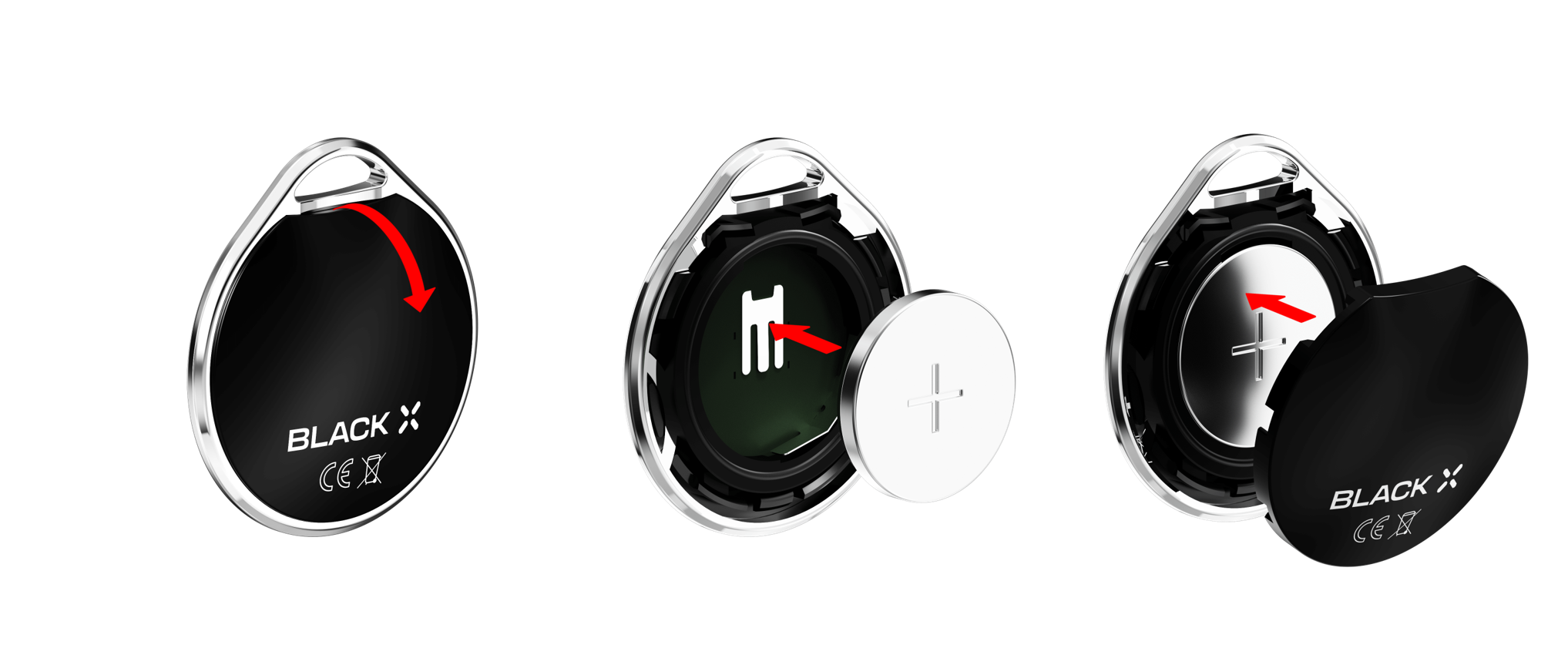
- Open the outer cover downward, to detach it from the base. Note: A tool may be required to apply additional pressure for opening.
- Insert a CR2032 battery with the positive (+) side facing up.
- Secure the outer cover onto the base by pressing it firmly into position
until it clicks securely.
Looking for more?
Our assistant can help refine your search, or you can reach our support team directly.