BLACK X eKey
An eKey is a digital key that lets you grant secure access to your BLACK X lock. As the lock owner, you control who can enter, when, and for how long. Sending an eKey is simple and can be managed entirely from the app.
Benefits of eKeys
- Instant Sharing - Grant access without physical keys.
- Flexible Control - Set access as permanent, temporary, or one-time.
- Easy Management - Change or revoke access anytime via the app.
- Enhanced Security - eKeys cannot be lost or copied.
Full control of who enters, when, and for how long.
How to Send an eKey?
- Open the BLACK X app and select your lock.
- Tap the key icon and choose “send eKey”.
- Select the access period of the autorised access and complete the required fields.
- Tap Send.
After sending, you can choose whether the user receives the eKey via email or SMS. This message includes the instructions and their eKey.

What Does the Authorized User Receive?
When an eKey is created, the authorized user will receive two updates:
- Instructions for downloading the app
This email includes a link to the BLACK X app in the App Store or Google Play, along with login credentials.
Note: This email is sent only to first-time users. - Notification that the eKey is ready
The user will receive either an email or an SMS (depending on the admin’s choice). This confirms that the digital key has been issued and linked to the user’s account.
Once the user signs in, the owner’s lock will automatically appear in the app. From that moment, the user can lock and unlock the door using their smartphone.
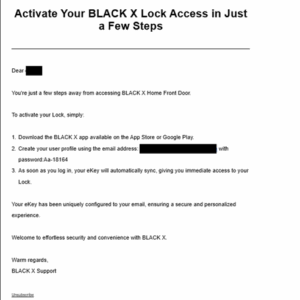

Troubleshooting:
If the initial email was not received, you can download the app and select “Reset Password” using the email registered in the system.
How to delete an eKey?
- Open the BLACK X app and select your lock.
- Tap the key icon to open the eKey menu.
- Tap the trash can icon next to the eKey you want to delete.
- Confirm 'Delete'.
How to imprt an eKey from another lock?
You can import the eKey from one lock to another by following these steps:
Open the app and select the lock you want to transfer the eKey to.
Go to Settings of the lock you chose> tap on 'Import from another lock'.
Choose the lock that already has the relevant eKey.
Tap 'OK' and 'Proceed'.
Important Notes
- If the user who received the eKey tries to create a new account after the eKey has already been issued, the app will display a message that the email address already exists.
- In this case, the user should log in with the same email address and the temporary password provided in the email. They can later update the password in the app for their own security.
- If the email was not received, please ask the user to check their spam/junk folder.

Looking for more?
Our assistant can help refine your search, or you can reach our support team directly.